OPSI (Open PC Server Integration): A Comprehensive Encyclopedia of the Most Powerful Open Source Device Management Solution
In an era where digital infrastructure dictates the rhythm of organizations, the burden on IT teams of manually managing hundreds or thousands of devices becomes unacceptable in terms of cost and time. Reinstalling operating systems, distributing applications, installing drivers, and ensuring consistency across devices are all tasks that consume enormous human resources if not automated. Here, OPSI (Open PC Server Integration) emerges as one of the strongest professional enterprise‑grade open‑source solutions, designed specifically to manage clients and servers in local area networks (LAN) from start to finish without a technician ever leaving their desk.
OPSI is uniquely capable of combining two critical missions in a single platform: operating system deployment from scratch (OS Deployment) and software distribution and updates (Software Deployment) through a unified management interface. Instead of dealing with rigid disk images as in traditional solutions, OPSI relies on fully automated clean installations, ensuring unparalleled flexibility when dealing with devices from different manufacturers. This system, developed by the German company uib and released under an open‑source license, has become a cornerstone for managing fleets of devices in universities, hospitals, and government agencies worldwide.
In this article, we will dive deep into OPSI, analyzing the architecture of its server, client agent, and boot images, and tracing the complete stages of installing Windows or Linux over the network—starting from a Wake‑on‑LAN signal and ending with a fully ready device handed over to the end user with all its software. We will spotlight its strongest feature, the automatic driver integration via an intelligent repository, and document how UEFI support evolved from a paid module to a free integrated feature, supported by case studies, statistics, risk analysis, and a future outlook.
What is OPSI? Origin and Evolution
[DEV] زيارة محظورة — IP: ::1
OPSI stands for Open PC Server Integration. The project began in Germany in 2004 as an initiative to provide a professional tool for managing computers in educational institutions and public bodies without the burden of expensive licensing. The founding team, led by uib, focused on building a client‑server architecture running entirely on Linux, capable of automating the installation of both Windows and Linux over the network. From the start, the system adopted the concept of clean installation using unattended answer files rather than cloning images, making it fundamentally different from solutions like Ghost or Acronis.
As the technology matured, OPSI adopted standard protocols such as PXE, DHCP, and TFTP, and later added support for UEFI disks and Secure Boot. Early 3.x and 4.0 releases laid the foundation, but the quantum leap came with version 4.1, which introduced the modern web interface and support for the integrated software repository. Then came versions 4.2 and 4.3, which strengthened free UEFI support, improved the driver repository, and added integration with configuration management systems such as Ansible. Today OPSI is used in networks encompassing tens of thousands of devices and is considered a reference in the category of open‑source client management systems.
System Architecture: The Three Core Components
[DEV] زيارة محظورة — IP: ::1
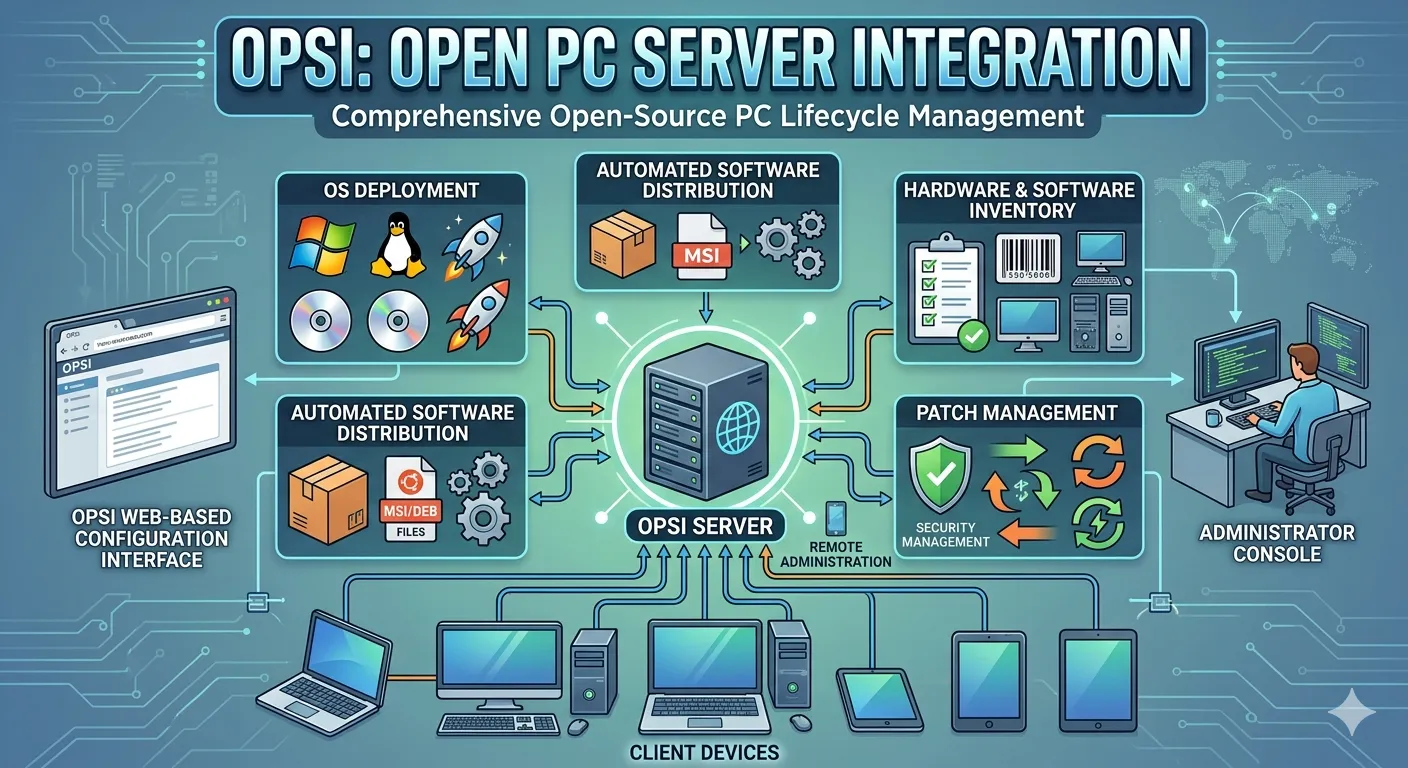
The OPSI architecture relies on three fundamental components that integrate to form the complete management system. The first component is the central OPSI server (OPSI Server), the heart of the setup, which must be installed on a stable Linux distribution such as Ubuntu or Debian. This server houses the operating system repositories (extracted ISO files and automated installation engines), the software and updates repository, as well as the essential network services: a DHCP server to distribute IP addresses and direct clients to the TFTP server, and a TFTP server that delivers the network bootloader. All these components are managed from a single central point.
The second component is the central management interface (OPSI Web Console / Configuration Editor). This is a rich management interface accessible via browser or as a standalone Java application. Through it, the system administrator can optically scan all connected network devices, group them, and define the operating systems and software assigned to each device or group. The interface provides a comprehensive dashboard showing the status of every client, installation history, and error logs, turning the management of a fleet of heterogeneous devices into a simplified visual task.
The third component is the miniature boot image (OPSI Boot Image), a super‑lightweight Linux system built automatically by the server. When a target device boots over the network using PXE, this image is loaded into the device’s RAM without any need for local storage media. This temporary environment acts as an intermediary bridge; it possesses the basic network and hard disk drivers and listens for commands from the OPSI server. Based on stored instructions, it either prepares the hard disk and starts the Windows or Linux installation, or launches diagnostic and repair tools.
Network Boot Mechanism: Practical Step‑by‑Step Stages
[DEV] زيارة محظورة — IP: ::1
The fully automated journey begins without the system administrator taking a single step toward the target device. In the first stage (Network Boot), the device can be powered on or remotely restarted using the Wake‑on‑LAN feature natively supported by OPSI. If the device does not support this feature, it can be turned on manually, and the rest of the path remains entirely automated. Once the network interface card (NIC) becomes active, the device searches for a DHCP server to obtain an IP address. The DHCP server pre‑configured on the OPSI server does more than deliver an address; it provides the device with the TFTP server address and the name of the bootloader file (pxelinux.0 or bootx64.efi).
In the second stage, the device connects to the TFTP server via the PXE protocol and downloads the appropriate bootloader (BIOS or UEFI). This bootloader either presents a simple boot menu or proceeds automatically according to pre‑configured settings. The third stage is critical: the device contacts the OPSI server again (this time over HTTP/HTTPS) and sends its unique identifier (MAC Address). If the system administrator has previously assigned an installation order to this device through the management interface, the server responds by sending the miniature boot image (Boot Image) into the device’s RAM. Within seconds, the client turns into a live Linux environment capable of partitioning disks and executing installation procedures.
Automated Installation: Clean Windows and Smart Automation
[DEV] زيارة محظورة — IP: ::1
Unlike commercial solutions that rely on cloning rigid disk images (image‑based), OPSI adopts a clean installation approach, which grants tremendous flexibility. For Windows systems, the system launches the setup program (setup.exe) directly from the extracted installation files on the server, using unattended scripts that automatically fill in all installation data. These scripts pre‑define the system language, Windows edition (Pro, Enterprise), user name, activation key, hard disk partitioning scheme, and even time‑zone settings, without a single dialog box appearing to the user.
For Linux systems, OPSI supports major distributions like Ubuntu, Debian, Red Hat, and CentOS using the official automation files for each distribution: Preseed files for Debian/Ubuntu, and Kickstart files for Red Hat/Fedora. The system administrator can write these files directly from the OPSI interface or import them, so that they answer all the installer’s questions (language, disk partitioning, packages to install, network settings). The result is the same: after the first reboot, the user finds a device ready with a clean operating system, free of unwanted software, and perfectly matching the defined specifications.
Automatic Driver Integration: OPSI’s Strongest Feature
[DEV] زيارة محظورة — IP: ::1
Perhaps the most distinguishing feature of OPSI over other OS deployment solutions is its intelligent automatic driver integration system. In heterogeneous environments, administrators face a real nightmare when dealing with devices from different vendors (HP, Dell, Lenovo), each carrying unique chipsets and components. Traditional solutions require building separate images for each model, or manually injecting drivers. OPSI, on the other hand, maintains a hierarchical driver repository on its server, organized by manufacturer and model.
When a Windows installation begins, an OPSI script reads the device’s hardware identifiers (Hardware IDs) from the BIOS/UEFI and the System Management BIOS (SMBIOS). Using this data, it goes to the repository and precisely selects the matching drivers for the motherboard, graphics card, network card, and storage controller. These drivers are injected into the Windows installation folders before the first boot, ensuring that the new system recognizes all components immediately without any manual intervention. This mechanism allows the same Windows 10 or 11 setup to be installed seamlessly on twenty different models simultaneously, with no extra configuration.
The OPSI Client Agent and Silent Software Distribution
[DEV] زيارة محظورة — IP: ::1
Once the operating system installation is complete and the device reboots for the first time, the final phase of automation begins. During the installation process, OPSI had planted a small program called the opsi‑client‑agent. This agent is automatically installed as a background service and immediately connects to the OPSI server over HTTPS to ask: “What software has the administrator assigned to me?” The server responds with the list of software products linked to this device beforehand, and the agent starts pulling the OPSI packages and executing them in complete silence without any user intervention.
These programs range from the Chrome browser and 7‑Zip compression tool to office suites, antivirus software, network printers, and everything the employee needs. Importantly, the installation process follows strict policies: it can be scheduled to start only after working hours, and installation rights can be restricted (administrator only). The agent also sends periodic reports back to the server on the status of installed programs, allowing the administrator to monitor policy compliance and detect any unlicensed software. The final result: a device delivered fully ready to the user, with an up‑to‑date operating system and all its essential applications, without a technician ever touching it.
Evolution of UEFI Support: From Paid Extension to Free Feature
[DEV] زيارة محظورة — IP: ::1
The transition from legacy BIOS to UEFI posed a major challenge for all network deployment tools. Initially, UEFI support in OPSI was a technical hurdle requiring a rewrite of parts of the bootloader and support for security protocols like Secure Boot. In OPSI versions 4.0 and 4.1, the UEFI module was sold as a separate commercial extension, which limited its adoption among users who relied on the fully free version. This was a source of frustration for small organizations whose devices had fully migrated to UEFI.
With version 4.2 and then the landmark version 4.3, the development team made a strategic decision to fully and freely integrate UEFI support into the open‑source edition. System administrators no longer needed to purchase additional licenses to operate modern hardware. Current support includes UEFI network boot using bootx64.efi, handling GPT partition tables, and enabling Secure Boot via signed certificates. This shift strengthened OPSI’s position as a truly complete free solution and attracted thousands of new users who had been hesitant due to previous UEFI limitations.
Installation and Initial Setup Requirements
[DEV] زيارة محظورة — IP: ::1
To run an OPSI environment, you first need a server machine running Linux, with Ubuntu 20.04/22.04 LTS or Debian 11/12 being the recommended distributions to ensure compatibility and long‑term support. This server can be a physical machine or a virtual appliance, provided it offers sufficient storage for the operating system and software repository (at least 100 GB is recommended). After installing the base system, you add the official OPSI software repository and then install the main server packages via the apt package manager. The automated installation scripts handle the setup of internal databases (MySQL/PostgreSQL) and the DHCP and TFTP services almost automatically.
After installing the opsi‑server package, you run the initial configuration helper (opsi‑setup), which prompts the administrator for network settings and the DHCP address scope. Next, the graphical management interface (opsiconfd) is installed, allowing access to the management dashboard through a browser on port 4447. The next step is to upload operating system distributions to the repository using the opsi‑package‑manager command, then prepare the software products (packages like Chrome, Firefox, LibreOffice) that are freely available in the OPSI community repository. From this point onward, the server is ready to discover network devices and start remote deployment operations.
Case Study: Implementing OPSI in a Multi‑Lab Educational Institution
[DEV] زيارة محظورة — IP: ::1
In the autumn of 2025, a private university with 12 computer labs (a total of 300 devices) faced a major challenge at the start of each semester. Re‑imaging the devices with the new curriculum software used to require two weeks of manual labor: installing Windows 11, installing specialized applications like Matlab and AutoCAD, and configuring network printers. With a mix of device models including HP EliteDesk, Dell OptiPlex, and Lenovo ThinkCentre, driver injection alone was a nightmare. The IT department decided to migrate to OPSI.
After installing the OPSI server on a simple Ubuntu Server machine, the team built a distribution repository containing Windows 11 Education and Ubuntu 22.04 for open‑source courses. Using the Product Properties feature, they prepared OPSI packages for the required software, and built a hierarchical grouping structure: each lab represented a group. For each group, they defined the operating system, the software (design or programming suite), and the default printer. They then triggered a mass Wake‑on‑LAN command, and overnight all the devices booted via PXE, the operating systems were installed, drivers were automatically loaded, and software was silently deployed. By morning, the labs were 100% ready, and what used to take two weeks was accomplished in hours. This case embodies the concept of “from‑scratch deployment at the click of a button.”
Statistics and Facts on Open Source System Management Adoption
[DEV] زيارة محظورة — IP: ::1
According to a 2024 survey by the Linux Foundation, 43% of organizations managing more than 500 devices use an open‑source solution for client management automation. Within this category, OPSI is one of the top four solutions in the European region, particularly in Germany, Austria, and Switzerland, where it is estimated that 15% of public universities and 22% of municipalities rely on it as their primary tool. This spread is attributed to its extremely low total cost of ownership compared to solutions like Microsoft SCCM or Ivanti, while retaining comparable automation capabilities.
Another important indicator: according to OPSI community statistics, the number of active server installations exceeds 12,000 worldwide, managing a total of more than 1.5 million client devices. The decision to make UEFI support free in version 4.3 led to a 67% increase in downloads the following year. In a typical scenario, the average time to deploy Windows 10 with 10 accompanying applications via OPSI on a gigabit network is only 22 minutes, whereas the manual method takes at least 3 hours per device, representing an 88% saving in human effort.
Simulated Dialogue: A Consultancy with an Infrastructure Advisor
[DEV] زيارة محظورة — IP: ::1
IT Manager: We have 200 devices in our company and are planning a refresh and system upgrade. We currently use old Ghost images and struggle with driver issues. Is OPSI suitable for us?
Systems Consultant: Good day. Yes, OPSI seems ideal for your situation. The fundamental difference is that it does not rely on images; instead it installs Windows from the original installation files and copies drivers automatically according to each device model. I advise you to build the server on Ubuntu, upload your distributions, and spend some time preparing the software packages you use. Once you get used to the interface, you will be able to reinstall any device on the network in minutes without leaving your desk.
IT Manager: We are concerned about UEFI and Secure Boot because most of our new devices come with it enabled. Will it work?
Systems Consultant: Rest assured, since version 4.3 UEFI and Secure Boot support has been free and built in. You will only need to import the appropriate certificates into the OPSI server so that clients trust the bootloader. The process is well documented in the administrator guide. Try it initially on a small mixed‑hardware group, and you will see for yourself how smoothly the system handles each model.
Roadmap: Evolution of OPSI Versions Over Time
[DEV] زيارة محظورة — IP: ::1
- 2004: Version 1.0 – Started as an internal project for managing Linux and Windows devices in a German educational environment.
- 2009: Version 3.0 – Complete server rewrite in Python, initial support for PXE and integrated DHCP.
- 2014: Version 4.0 – Introduction of the modern web interface, support for silent software distribution as separate products.
- 2018: Version 4.1 – Major improvement in driver repository, Windows 10 support, UEFI module as a paid extension.
- 2021: Version 4.2 – Partially free UEFI support, improved compatibility with modern Linux distributions and Secure Boot.
- 2023: Version 4.3 – UEFI and Secure Boot fully free, integration with Ansible and SaltStack, PostgreSQL support as a database alternative.
Intervention Priorities: When is OPSI the Optimal Choice?
[DEV] زيارة محظورة — IP: ::1
No single solution fits all, but we can identify scenarios where OPSI clearly excels. If your organization has more than 50 devices spread across multiple branches and uses a mix of hardware from different manufacturers, OPSI saves you the trouble of building multiple images. If you need to periodically reinstall devices (such as in educational labs or training centers), the automated clean installation makes the process nearly instant. Additionally, institutions that embrace open‑source policies find in OPSI a solution that does not impose per‑device licensing fees.
On the other hand, if the environment is completely homogeneous (a single device model) and already uses solutions like Microsoft Endpoint Configuration Manager with enterprise agreements, migrating to OPSI may simply be an extra burden. Likewise, organizations lacking staff with experience in managing Linux servers may face a learning curve. In such cases, one can start with a pilot project on a small scale and gradually train the team. The priority is always to evaluate the total cost of ownership (TCO) and the return on human investment, not just the monetary license cost.
Brainstorming: Unconventional Uses for the OPSI Platform
[DEV] زيارة محظورة — IP: ::1
• Deploy self‑service kiosks: Using OPSI, you can set up devices with a locked‑down Linux system running only a browser in kiosk mode and deploy them over the network in airports or hospitals without touching them manually.
• Mobile ethical hacking labs: Create a configuration that automatically installs Kali Linux or Parrot OS with a defined set of tools, preparing a temporary penetration testing lab in any training room that can be wiped after use.
• Manage high‑end IoT gateways: Some IoT gateways run full Linux on x86. OPSI can manage them, updating their firmware and software packages remotely just like any office device.
• Simulate software test environments: OPSI can periodically and automatically rebuild workstations with specific specifications (Windows + old browsers) in a QA lab for compatibility testing.
Risk Analysis: Security Dimensions and Operational Challenges
[DEV] زيارة محظورة — IP: ::1
As an open‑source project, OPSI enjoys high transparency, but that does not exempt it from security challenges. The first weak point lies in the DHCP and TFTP servers: if an attacker manages to set up a rogue DHCP server on the network, they can redirect devices to a malicious boot image. The solution is to implement DHCP Snooping on managed switches. Second, the communication between the client and server must be encrypted over HTTPS, and trusted certificates must be installed on the server to avoid man‑in‑the‑middle (MITM) attacks. Neglecting this point could expose credentials and deployment processes to risk.
From an operational standpoint, the biggest risk is relying on a single server without disaster recovery planning. If the main OPSI server fails, all deployment and software management operations halt. Therefore, it is recommended to perform regular backups of the database and software repository, and to prepare a secondary standby server that can be quickly promoted. Finally, access to the management interface must be strictly controlled, because anyone with “OPSI administrator” privileges can deploy operating systems to any device or wipe its disks. Applying the principle of least privilege is mandatory.
The Future of System Management: OPSI, AI, and IoT
[DEV] زيارة محظورة — IP: ::1
The OPSI project is moving toward integrating artificial intelligence capabilities to improve repository efficiency. A predictive algorithm is being developed that analyzes software usage patterns in the organization to automatically suggest which software packages should be pre‑staged for each user group, thus reducing provisioning time. Driver integration will also see a leap through continuously updated cloud databases fed by community contributions, so that new devices instantly receive their drivers without waiting for the local server to be updated.
In the era of the Internet of Things (IoT) and edge computing, OPSI’s mission expands to include managing non‑traditional devices such as industrial gateways and point‑of‑sale (POS) terminals. Through experimental support for ARM and RISC‑V architectures, OPSI could become the backbone for deploying customized Linux systems on tens of thousands of geographically distributed devices. Integration with Infrastructure as Code (IaC) tools like Ansible and Terraform will make it possible to define the entire client infrastructure as version‑controlled text files. OPSI, with its open spirit, remains at the forefront of this transformation.
Frequently Asked Questions
[DEV] زيارة محظورة — IP: ::1
- What is the difference between OPSI and imaging solutions like Clonezilla?
- Clonezilla works by copying hard disk sectors (image‑based), making it fast for identical hardware but inflexible when hardware differs. OPSI performs an automated clean installation (file‑based) and copies drivers automatically for each model, making it ideal for heterogeneous environments.
- Can OPSI manage only Windows devices or only Linux devices?
- OPSI supports both. You can deploy Windows 10/11 and Windows Server, as well as Linux distributions such as Ubuntu, Debian, and CentOS from the same server, using the same automation mechanism. You can also mix both types on the same network and manage them from a single interface.
- How long does it take to install 50 devices simultaneously with OPSI?
- It depends on network speed and server capacity, but generally the actual installation phase (after loading the boot image) takes 20‑30 minutes per device. Because OPSI uses multicast for transferring large files, 50 devices can all finish in roughly the same time as a single device—typically under 45 minutes.
- Is OPSI completely free?
- The core edition (Community Edition) is free and open‑source, and contains all the features mentioned, including UEFI and Secure Boot support. Paid support and consulting services are offered by uib for organizations that want maintenance contracts and formal training courses, but the software itself is free of charge.
Trusted References and Sources
[DEV] زيارة محظورة — IP: ::1