Malware & Viruses: Types, Uses, and What They Do to Your Device
A comprehensive, in-depth guide covering the most notable types of malicious software detected by modern security tools — from exploit vulnerabilities and trojans to worms and hack tools — with detailed explanations of their mechanisms and the best modern methods to defend against them.
Introduction: The Birth and Evolution of Malware
Malware — short for malicious software — is an umbrella term that encompasses any program or piece of code deliberately designed to damage computer systems, steal data, or surveil users without their knowledge or consent. Far from appearing overnight, malware has undergone a long evolutionary arc stretching from the early 1970s all the way to the present day, growing in sophistication, scale, and destructive potential with each passing decade.
The first program widely considered a precursor to modern malware was Creeper, which appeared on the ARPANET network in 1971. It spread autonomously between machines and displayed a simple text message — it caused no real damage, but it established the concept. In 1986, the first PC virus targeting IBM-compatible machines emerged: Brain, created by two Pakistani brothers to track unauthorized copies of their software. It spread unexpectedly through floppy disks, infecting machines worldwide.
Through the 1990s, the explosion of personal computing and the commercialization of the internet turned malware proliferation into a mass phenomenon. By the early 2000s, malicious software had become an instrument of organized crime — no longer a showcase of technical curiosity, but a tool for financial theft and large-scale fraud. The second decade of the millennium brought nation-state cyberweapons and ransomware, while today we face AI-assisted malware and supply chain attacks of unprecedented subtlety.
The Microsoft Safety Scanner results that prompted this article detected a rich cross-section of modern malware families: exploits, trojans, viruses, hack tools, worms, and obfuscation utilities. Each represents a distinct threat category, and understanding them individually is the first step toward building an informed defense.
I. Exploits — Weaponized Vulnerabilities
What is an Exploit?
An exploit is a piece of code, a sequence of data, or a chain of commands that takes advantage of a flaw — called a vulnerability — present in a software application, operating system, or network protocol. The key distinction between an exploit and other malware is that an exploit does not function independently: it requires an existing, unpatched weakness to target. Once that weakness is leveraged, the exploit can grant the attacker unauthorized access, escalated privileges, or the ability to crash a system entirely.
The entry flagged by Microsoft Safety Scanner — Exploit:AndroidOS/CVE-2011-1823!rfn — references a documented vulnerability in the Android operating system catalogued as CVE-2011-1823. This flaw resided in a component known as GingerBreak, which allowed a malicious application to escalate its own privileges to root level without any user authorization. The suffix "!rfn" is an internal Microsoft classification marker indicating the detection cluster or research group that catalogued this variant.
Exploits are generally classified by the target they attack: browser exploits (targeting rendering engines or JavaScript interpreters), kernel exploits (attacking the OS core for maximum privilege), application exploits (targeting specific software like PDF readers or media players), and network protocol exploits (abusing weaknesses in protocols such as SMB or RDP). Each category carries different risk profiles and requires different mitigations.
What makes CVE-2011-1823 particularly relevant over a decade after its discovery is the vast ecosystem of unpatched Android devices that persists globally. Hundreds of millions of low-cost smartphones — common in emerging markets — run Android versions that ceased receiving security updates years ago. For attackers, these devices represent a perpetual attack surface, and this specific exploit remains a functional weapon against them.
Exploits rarely cause harm by themselves. They function as an attack vector — the door the attacker uses to enter — after which a second-stage payload (typically a trojan, spyware, or backdoor) is delivered. This is why exploit detections almost always accompany other malware detections in a security scan, as seen in the Safety Scanner results that inspired this article.
II. Trojans — The Deceptive Invaders
The Concept and Core Mechanism
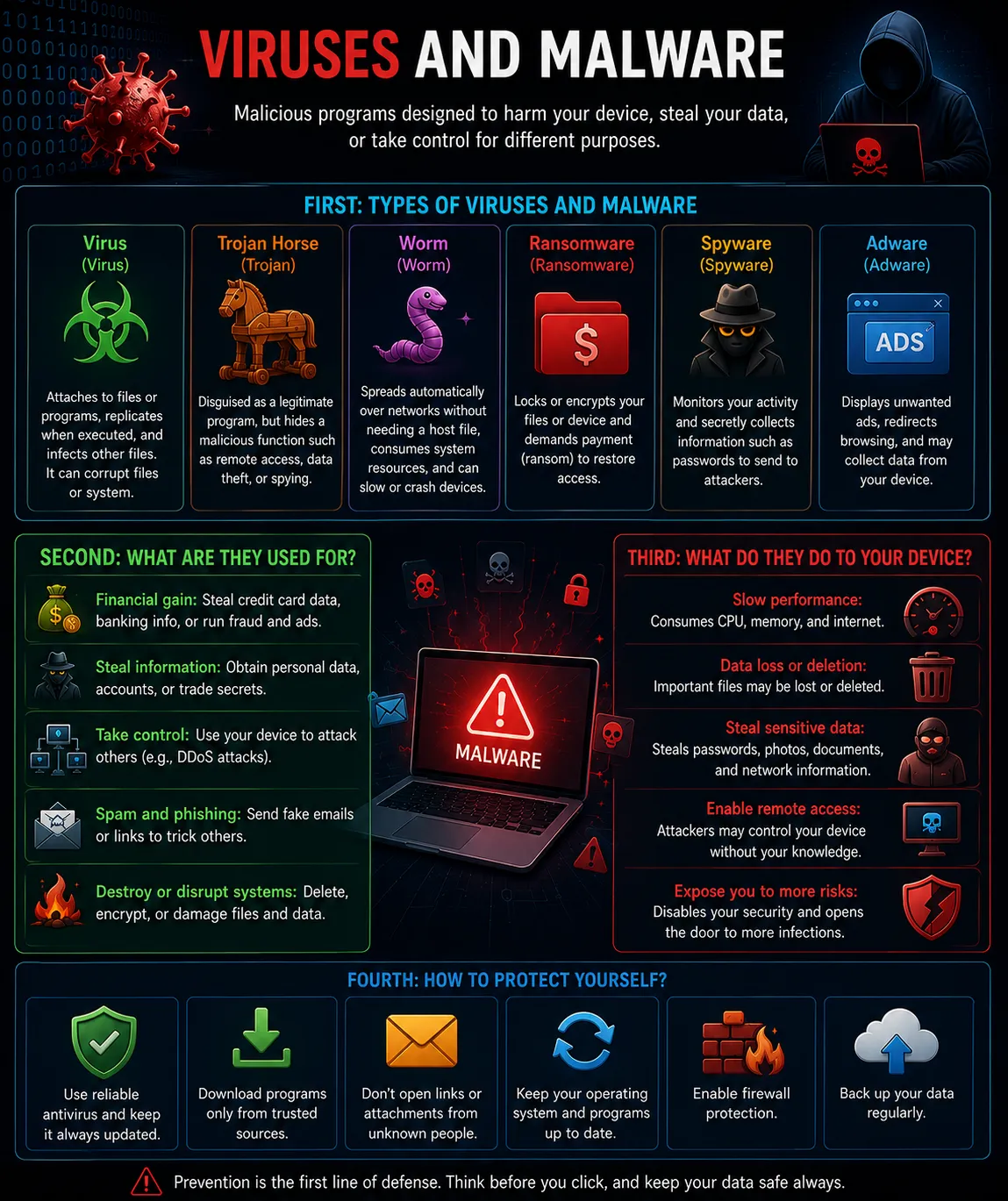
A Trojan horse — named after the legendary Greek stratagem — is a program that presents itself to the user as something benign or useful (a game, a utility, a system update, or even a fake antivirus tool), while concealing malicious functionality within. The defining characteristic that separates trojans from viruses is that trojans do not self-replicate: they rely entirely on the user executing them. Social engineering — convincing the target to run the malicious file — is the trojan's primary delivery mechanism.
Three distinct trojans appear in the Safety Scanner results: Trojan:AndroidOS/Skygofree, Trojan:VBS/Ramnit.psyAI!MTB, and Trojan:Win32/Malgent. Each targets a different platform and pursues a different objective.
Skygofree — An Advanced Mobile Surveillance Trojan
Skygofree is among the most sophisticated Android trojans ever documented. First uncovered in 2018 by researchers at Kaspersky Lab, it possesses surveillance capabilities that rival commercial spyware sold to governments: it can record audio even when the microphone appears disabled, capture photographs without illuminating the screen, intercept WhatsApp messages by abusing Android's Accessibility Service API, and force the infected device to connect to attacker-controlled WiFi networks for traffic interception.
Its delivery mechanism relies on convincing fake web pages that impersonate Italian internet service providers, prompting the user to install a "necessary network update." Once installed, Skygofree registers itself as an Accessibility Service — a privileged Android API meant for users with disabilities — granting it sweeping visibility over every other application on the device, including encrypted messaging apps.
Ramnit — The Persistent, Multi-Vector Threat
Ramnit is one of the most thoroughly documented and persistently dangerous malware families in existence. It defies simple classification because it combines behaviors from multiple categories: it spreads through files like a virus, but it also opens a remote-access backdoor like a trojan. The variant Trojan:VBS/Ramnit.psyAI!MTB is written in Visual Basic Script. The "psyA" suffix identifies a specific behavioral variant, while "!MTB" (Microsoft Threat Behavior) indicates the detection was triggered by behavioral analysis rather than a static signature match.
Ramnit primarily targets HTML files, executable binaries (.exe), and dynamic link libraries (.dll). It injects its own code into these files, ensuring it is executed whenever the host file is opened or run. A practical example: a folder containing 300 HTML files from an old web project becomes an infection reservoir — every file is modified, and opening any one of them in a browser silently triggers the malicious payload.
Malgent — The Generic Remote Access Trojan
Trojan:Win32/Malgent is a generic detection name (also called a "family name") used by Microsoft to flag files exhibiting behaviors consistent with a Remote Access Trojan (RAT) but not matching any specific known variant. RATs are among the most dangerous trojan subtypes: once active, they grant the attacker a live remote shell into the victim's machine. Capabilities typically include file transfer in both directions, screen capture and keylogging, activation of the webcam and microphone, execution of arbitrary commands, and lateral movement within the local network.
III. Traditional Viruses — Self-Replicating Code
The Precise Definition
In technical security terminology, a virus has a specific meaning: it is a program capable of copying itself and inserting those copies into other files — much like a biological virus that requires a living host cell to replicate. A virus cannot operate in isolation; it attaches to a host file and activates when the user opens or executes that file. This dependency on user action distinguishes viruses from worms, which spread entirely autonomously.
The Safety Scanner results show three virus entries all belonging to the Ramnit family: Virus:VBS/Ramnit.gen!A, Virus:VBS/Ramnit.gen!C, and Virus:Win32/Ramnit.P. The letters "gen!A" and "gen!C" denote distinct genetic variants — slightly different versions of the same core codebase, modified enough to evade variant-specific signature detection while preserving the same fundamental behavior.
Ramnit as a Virus: HTML and Executable Infection
The VBS variants of Ramnit operate by injecting malicious VBScript or JavaScript code into HTML files found on the infected system. When any of those files is subsequently opened in a web browser — whether by the original user, a colleague on the same network, or a visitor to a locally-hosted website — the injected code executes silently. It then searches for additional HTML files to infect, propagating through the file system in a cascading pattern.
To illustrate with a concrete example: suppose a web developer stores a project folder containing 400 HTML templates on their machine. Ramnit.gen!A infects all 400 files by appending a small block of obfuscated script to each. When the developer previews any template in their browser, the script runs, attempts to contact a command-and-control server, and begins searching for more files to infect. The developer may notice nothing unusual for days or weeks.
Virus:Win32/Ramnit.P — Targeting Executable Files
The Win32 variant extends the infection surface to executable binaries (.exe) and dynamic-link libraries (.dll). It embeds itself inside the PE (Portable Executable) header structure of these files so that every time the user launches an infected application, the virus code runs first. Manual removal is complicated by the fact that cleaning the infection from a .dll file risks corrupting a legitimate program that depends on it — in practice, reinstallation of affected software is often required.
Why VBScript as an Attack Language?
Malware authors chose Visual Basic Script for Ramnit's scripting variants because VBScript is a native Windows component, interpreted directly by wscript.exe or cscript.exe — system binaries that ship with every version of Windows. This means no additional runtime libraries need to be installed, and early-generation antivirus tools often whitelisted VBScript execution as "normal system activity," giving Ramnit a significant detection evasion advantage in its heyday.
IV. HackTools — Dual-Use Penetration Utilities
Definition and the Dual-Use Problem
HackTools occupy a uniquely contested space in cybersecurity: they are frequently legitimate software used by penetration testers, forensic investigators, and security researchers — yet when found on a machine without professional justification, they serve as strong indicators of malicious intent or active compromise. Security vendors like Microsoft classify them as either PUA (Potentially Unwanted Applications) or direct threats depending on context, behavioral signals, and the presence of accompanying malware.
Two entries appear in our scan: HackTool:Win32/AndroidUnlocker and HackTool:Win32/AndroidUnlocker!MTB. Both refer to Windows-based utilities designed to bypass the lock screen of Android devices.
AndroidUnlocker: Mechanism and Misuse
Android Unlocker tools are desktop applications that connect to an Android device via USB and use one of several techniques to bypass authentication: exploiting the Android Debug Bridge (ADB) protocol, leveraging recovery mode vulnerabilities, or flashing modified firmware images that strip the lock screen entirely. Legitimate use cases exist — a device owner who has genuinely forgotten their PIN can use such tools to regain access. In criminal contexts, however, these tools are instruments of data theft and privacy violation.
The suffix !MTB in HackTool:Win32/AndroidUnlocker!MTB confirms that detection was triggered by behavioral telemetry, not a static file hash. The combination of behaviors — establishing an ADB connection, querying device information, attempting to bypass authentication barriers — constitutes a pattern flagged as suspicious regardless of whether the file itself has a known malicious signature.
What makes these tools acutely dangerous is their speed: certain AndroidUnlocker variants can extract a complete local backup of an Android device — messages, photos, saved passwords, contacts, call history — via USB in under two minutes, leaving no visible trace on the device's screen or notification bar.
V. Worms — Self-Propagating Network Threats
The Critical Distinction Between a Worm and a Virus
A worm is fundamentally different from a virus in one crucial respect: it requires no host file and no user interaction to spread. A worm is a self-contained program that propagates autonomously across networks by exploiting vulnerabilities in network services, shared file systems, or removable storage. Once a single machine on a network is compromised by a worm, every other vulnerable machine on that network is at risk — without any user opening an attachment, clicking a link, or performing any action whatsoever.
The scan result shows: Worm:Win32/Mofksys.RND!MTB. The component "Mofksys" identifies a known worm family that primarily spreads via removable storage devices. "RND" indicates random behavioral patterns in how it selects propagation targets, and "!MTB" again signals detection through behavioral analysis rather than signature matching.
How Mofksys Operates: The USB Vector
Mofksys works by creating an autorun.inf file on every removable storage device — USB flash drives, SD cards, external hard drives — that connects to an infected machine. This configuration file instructs Windows to automatically execute a specified program when the drive is inserted into another computer. When an unwitting user plugs that USB into a clean machine, the worm silently installs itself and begins searching for new propagation targets: additional USB devices, shared network folders, and machines running vulnerable SMB (Server Message Block) services.
To illustrate the real-world danger: a single employee in a corporate office plugs in a personal USB drive that was previously connected to an infected home computer. Within hours, Mofksys has propagated across the office network to every machine running an unpatched version of Windows. No one clicked anything suspicious. No malicious email was opened. The damage happened entirely invisibly, through the act of sharing a USB drive.
History provides sobering precedents: Stuxnet (2010) spread via USB drives to reach air-gapped industrial control systems and physically destroy Iranian nuclear centrifuges — the first documented cyberweapon. Conficker (2008) infected an estimated 15 million machines across 190 countries using similar removable media and SMB exploitation techniques.
VI. VirTools — Code Obfuscation Abused by Attackers
VirTool:Win32/VMProtectIrfn represents a distinct and increasingly important category: the abuse of legitimate software protection tools for malicious obfuscation. VMProtect is a commercially available application genuinely used by software developers to protect their programs against reverse engineering and software piracy. It encrypts and virtualizes the application's code, making it extremely difficult to analyze.
Malware authors discovered that the same properties that make VMProtect useful for copy protection also make it effective at hiding malicious code from antivirus engines. When a trojan or ransomware payload is processed through VMProtect, the resulting binary becomes nearly opaque to static analysis tools. Traditional signature-based detection fails because the malware's byte pattern is completely transformed. The "Irfn" component in the detection name is an internal Microsoft classification cluster designating files that have used VMProtect in a behavioral context consistent with malware protection rather than legitimate software licensing.
Detecting VMProtect-obfuscated malware requires advanced dynamic analysis: the suspicious binary must be executed inside a secure sandbox environment where its actual runtime behavior can be observed, regardless of what the obfuscated code looks like at rest. This is computationally expensive and time-consuming, which is precisely why obfuscation is so attractive to attackers — it introduces friction and delay into the detection pipeline.
This category of tool is among the most challenging for security analysts to handle. Even experienced malware researchers may require hours to fully deobfuscate a VMProtect-wrapped sample, compared to seconds for an unprotected binary. In a threat landscape where time-to-detection is critical, this asymmetry heavily favors the attacker.
VII. The Historical Timeline of Malware Evolution
Phase 1 (1970–1990): Academic Curiosity and Early Experiments
Malware began as intellectual exploration. The creators of early viruses were often computer science students and researchers motivated by curiosity about self-replicating code rather than financial gain. The damage potential was low, and propagation relied on physically sharing floppy disks — a naturally slow medium. The Brain virus of 1986 and the Morris Worm of 1988 (which crashed approximately 6,000 machines, a significant portion of the early internet) represent the defining incidents of this era.
Phase 2 (1991–2000): Mass Propagation via Email
The proliferation of personal computing and the emergence of commercial internet services created an unprecedented propagation channel. Viruses traveled through email attachments, IRC file transfers, and early peer-to-peer networks. The ILOVEYOU virus of May 2000 is the defining event of this phase: it spread to an estimated 45 million machines within ten days, causing billions of dollars in damage — and it was written in fewer than 200 lines of VBScript, the same language family used by Ramnit.
Phase 3 (2000–2010): Organized Crime and Botnets
Malware transformed from a technical showcase into an organized criminal industry. Botnets — networks of thousands of compromised machines controlled by a single attacker — were industrialized for sending spam, hosting phishing pages, and executing distributed denial-of-service attacks. The Storm Botnet (2007) at its peak controlled an estimated 10 million machines. Malware-as-a-service emerged as a business model, with criminals renting botnet infrastructure and exploit kits rather than writing their own code.
Phase 4 (2010–2020): Nation-State Weapons and the Ransomware Epidemic
Stuxnet's 2010 revelation — a joint U.S.-Israeli operation that used a USB-spread worm to physically destroy centrifuges in an Iranian nuclear facility — established that malware had become a geopolitical instrument. Simultaneously, ransomware matured from a nuisance into a devastating criminal enterprise. WannaCry (2017) shut down portions of the UK's National Health Service; NotPetya (2017) caused an estimated $10 billion in global damages and was classified as a cyberweapon by multiple governments.
Phase 5 (2020–Present): AI-Assisted Attacks and Supply Chain Compromise
The current era is characterized by two transformative developments. First, AI-assisted malware generation: tools exist that allow low-skill attackers to generate novel malware variants that evade detection engines trained on historical data. Second, supply chain attacks — compromising legitimate software vendors to distribute malware to thousands of customers simultaneously — as demonstrated by the SolarWinds breach (2020), which penetrated the networks of multiple U.S. government agencies. The arms race between attackers and defenders has never been more technically demanding.
VIII. Modern Best Practices for Defense
1. Behavioral Detection Over Signature Matching
Traditional antivirus engines that rely on static file signatures are insufficient against modern malware families — particularly variants obfuscated with tools like VMProtect or freshly generated polymorphic variants. Modern endpoint protection platforms (EPP) such as Microsoft Defender for Endpoint, CrowdStrike Falcon, and SentinelOne use machine learning models trained on behavioral telemetry: if a process attempts to modify the registry, inject into a trusted system binary, and establish an outbound network connection simultaneously, that behavioral fingerprint triggers an alert regardless of whether the file itself is recognized.
2. The Principle of Least Privilege (PoLP)
No user account, application, or service should possess more privileges than required for its specific function. Running a web browser or messaging application with administrator privileges creates an enormous attack surface — as illustrated by CVE-2011-1823, which allowed apps to escalate to root. In enterprise environments, this means enforcing strict separation between standard user accounts and administrative accounts, and auditing service account permissions regularly.
3. Rapid Patch Management
The majority of successful exploit-based attacks — including CVE-2011-1823 — target vulnerabilities for which patches already exist. The problem is deployment lag: organizations and individuals fail to apply updates promptly. Enabling automatic updates for the operating system, browsers, and all installed applications eliminates the most common exploit vectors. For Android devices specifically, organizations should establish minimum OS version policies and replace devices that have exceeded their manufacturer support window.
4. Network Segmentation and Micro-Segmentation
Flat networks — where every device can communicate freely with every other device — are the ideal environment for worms like Mofksys and lateral-moving trojans like Malgent. Network segmentation divides the infrastructure into isolated zones (production, management, guest, IoT) so that compromise of one segment does not automatically grant access to others. Modern zero-trust architectures take this further, requiring explicit authentication and authorization for every connection regardless of network location.
5. Offline Backups and Tested Recovery Plans
Isolated, offline backups are the last line of effective defense against ransomware and destructive worms. The 3-2-1 rule is the established standard: maintain three copies of critical data, on two different storage media types, with one copy stored off-site or offline. Critically, backups must be tested regularly — a backup that has never been verified in a restoration drill is an untested assumption, not a recovery capability.
6. Multi-Factor Authentication and Credential Protection
Remote access trojans like Malgent and credential-stealing Ramnit variants specifically target saved passwords and session tokens. Multi-factor authentication (MFA) ensures that even successfully stolen credentials cannot be used without the physical second factor. Hardware security keys (FIDO2/WebAuthn) provide stronger protection than SMS-based or app-based TOTP codes, particularly against real-time phishing attacks that can intercept TOTP tokens.
References & Sources
- Microsoft Security Intelligence — Malware Threat Encyclopedia
- Kaspersky Securelist — Skygofree: Following in the Footsteps of HackingTeam (2018)
- NIST National Vulnerability Database — CVE-2011-1823 Detail
- CISA — Malware Threats and Advisories
- MITRE ATT&CK Framework — Adversary Tactics and Techniques
- AV-TEST Institute — Global Malware Statistics
- CrowdStrike — Types of Malware Explained